 by Greg Marine
 Notesprout
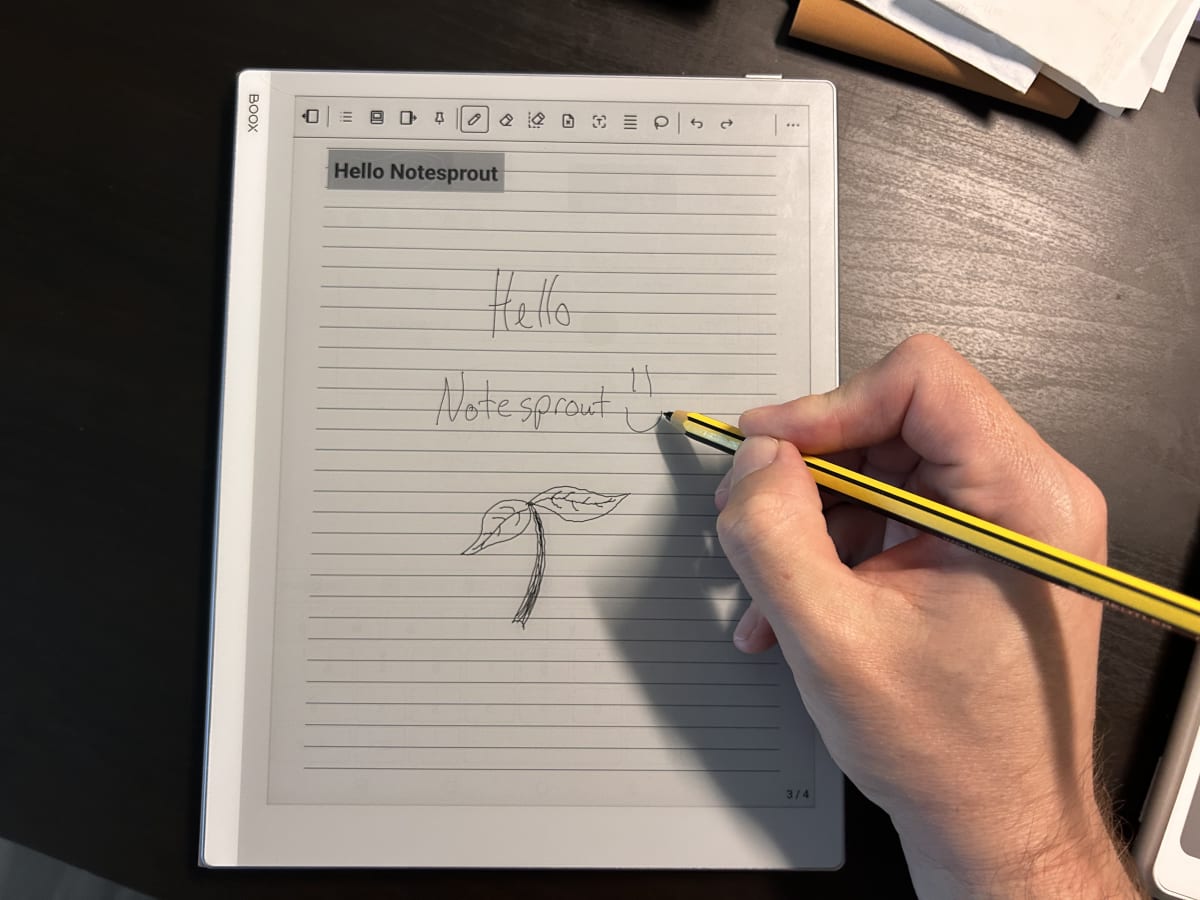
I’m officially using Notesprout as my daily driver for journaling!!! I’m so excited! I am also using it for basic notes and my grocery list. It isn’t quite ready for my more advanced work notes yet. But it is getting really close for that too! Its current state is way beyond a proof of concept (POC) or minimal viable product (MVP). It’s almost as advanced at the note apps for both BOOX and Supernote. That is mind blowing! Its initial creation date was just May 5th…wow!
The base concept of Notesprout is “it’s just paper.” Of course, it isn’t real paper and is very much an app. But when I’m writing with it, it doesn’t feel like an app. It feels like a real notebook. By “feel”, I’m referring to the sense I have with handwriting. So, no, it doesn’t actually feel like a pencil going across a piece of paper, exactly. It just doesn’t feel as cold as a computer in anyway. I do enjoy typing. But it just isn’t the same. And I don’t connect with the words like I do when I’m handwriting. That’s what I mean by “it’s just paper.” Writing gives me the “feels.”
As I was brainstorming what this app is for me, I landed on a horticultural theme. The slogan behind Notesprout is “Where thought has a place to grow.” The physical files that store each notebook have a “*.soil” extension. Those soil files are in the “Garden” folder of the app’s installation. Issues are “pruned” and features are new “growth” or “branches.” The thoughts get “planted” on the pages of the notebook and “grow” from there. What grows can then be sent along to wherever they need to go to keep growing; which basically means there is a way to export things into a form that can later be used for their intended purpose.
I’m targeting e-ink devices for now; specifically BOOX. But it also works on standard Android tablets already. The beauty of e-ink is that it is very similar to real paper in how you see the words. E-ink is a reflective screen instead of backlit. Real paper requires an external light source. So do these e-ink screens. Typical tablet and computer screens are shining light directly at you. E-ink does not. For some, this helps with health issues. For me, it’s mostly a personal preference. Although, I have discovered that I have less mental fatigue while using e-ink over typical screens. I feel like my brain “works” better with e-ink over typical backlit screens.
For Notesprout, I chose BOOX devices over Supernote, and other e-ink devices, simply because their company provides a software development kit (SDK) that allows me to leverage their stylus digitizer. E-ink has an extremely low refresh rate for painting content on the screen. Using the standard Android canvas for drawing is very sluggish on these devices. So the manufacturers do some specialized work to improve that. Onyx, the makers of BOOX, is currently the only one who provides a way for software engineers, like myself, to access “their way” of capturing stylus input and drawing strokes on the screen.
Ratta, Supernote’s company, is introducing a plug-in SDK soon to allow software engineers to add functionality to their various apps. So I’ll soon be able to leverage that to enhance their apps. It just isn’t ideal now that I have Notesprout. And this plug-in SDK does not allow me to access their digitizer within my own app as far as I know. But it’s something to keep an eye on for the future. The Supernote writing surface is the best I’ve found and I’m going to miss it. BOOX only wins because of their SDK.
I started the handwriting journey 2 years ago with our Bible study. It took a huge leap a year ago when I got my Kindle Scribe last May. Now that I’ve built Notesprout, I have a feeling another leap is on the horizon. The app is already doing things that the other note apps don’t do. And since it is “my” app, I can continue growing features that work for me. All of the note apps on these devices sort of bridge the gap between being human and working with a machine. Notesprout just does it better for me. It isn’t a better app. It’s just a different app. I’m looking forward to growing right along with it.
I mentioned this a few times on previous posts. I use Anthropic’s Claude AI and Claude Code tools to build Notesprout. That’s also how I built this website. I take on two or three roles while using these tools. I remain the engineer that envisions all aspects of Notesprout. I do allow the AI to help with some of the technical decisions by making suggestions for implementation. I still do the real engineer parts, though. Another role is as product manager. I come up with all the general ideas of what the app is supposed to do beyond how it is supposed to do it. And I suppose I have the role of tester as well. Although I can automate the testing, that is costly and a bit of a waste. Since I’m building the app for me, it makes sense that I’m physically testing everything as I go. And since I’m dogfooding the app, I’m the most natural person to run it through its paces.
Something I did not do from the beginning was prompt AI with “I want a note taking app like BOOX and Supernote. Build it for me!” There will still be people who would call Notesprout AI slop. I respectfully disagree. That term is typically used for content produced using AI. But I’ve noticed the same term used by people who are against software being developed using AI too. This isn’t a case of me not hiring a human to do the work. It’s a case of having an idea for an app I actually could have written myself. It’s just that it would have taken me years and it would never have gotten finished. Instead, I have a fully functioning app that I will now use everyday just one month after starting the work. It’s something I would never have hired someone else to do in the first place. I wasn’t trying to save money. It saved me time and I am getting exactly what I’m looking for to allow my thoughts to grow.
The concept of “So, I was thinking…” that went into this blog is where this all started, actually. Then, when I started to physically write my thoughts instead of just typing, my thoughts grew even more. Notesprout is the next logical evolution of everything that started a few years ago. I didn’t know back then that I would be making this app. And I don’t really know where this will take me next. It has been a fascinating journey so far, that’s for sure. I do have some hopes for it, though. I’d love to see this help with my writing; both fiction and non-fiction. I hope it helps with Bible study and organizing my work notes more efficiently. I have ambition to go back to handwriting this blog and exporting the notes directly into the website app. I only stopped doing that because of the friction caused by the mere number of steps it took to do that. And I’ve already seen it help with my journaling in just the few days I’ve been using it for that. My mind is so blown away by all of this.
I still have a lot of polishing to do with it. I also have to design its icon. I’m not even the least bit tempted in having AI design me an icon…LOL The name, the nomenclature, and the icon next, are all my brain child. Aside from my analytical mind, I am also quite creative; hence the rest of this website beyond the blog. I’ve sketched out some ideas for the icon. And I have ideas for polishing the look and feel of the toolbars, menus, and screen layouts. Once I get all of that worked out, I’ll likely publish Notesprout on Google’s Play Store for others to use with BOOX and general Android tablets. Plus there are ways I can make this work for Apple products and as a web app. But for now, it works well for me without the polish and an entire ecosystem to support.
Hello Notesprout! Welcome to the world!